S1 Quick Start Guide

■ What’s Inside

• 1× FoxBox S1 Appliance
• 1× Power Supply
• 1× Ethernet Cable
• 2× LTE Antennas

■ Quick Instructions

01. Open the FoxBox case.
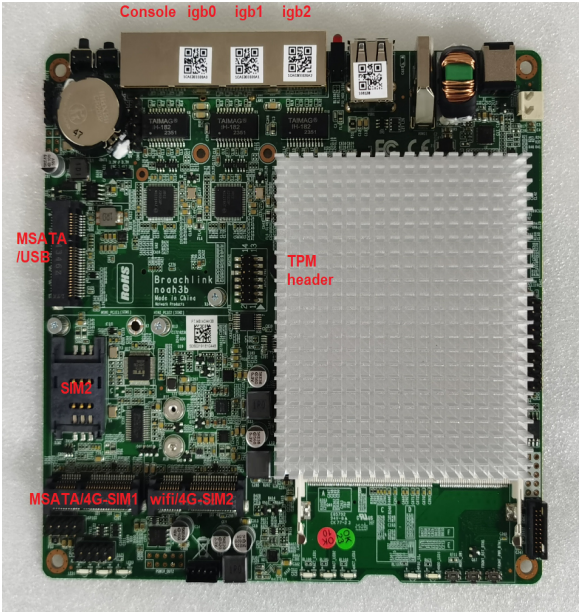
02. Insert the SIM card in the slot marked SIM2 (see image).
03. Close the case and fasten all four lateral screws.
04. Plug in the antenna connectors.
05. Plug in a RJ45 Ethernet cable.
■ Connect to IGB0 or IGB1 for Bonjour/ZeroConf as foxbox.local, or to IGB2 for static IP 192.168.1.98.
06. Plug in the power supply.

■ Hardware Overview

■ Access to FoxBox

Connection Type

Static IP (IGB2)

DHCP / Bonjour (IGB0 or IGB1)

Address / Hostname

https://192.168.1.98

http://foxbox.local

Notes

Use if connected to IGB2

Auto-discovery with Bonjour/ZeroConf

■ Default Credentials

Web Interface
User: admin
Password: foxbox


SSH Access
ssh [email protected]
Password: foxbox

■ Extra Tools

Configure network settings / IP / gateway
URL: https://192.168.1.98/console
Username: foxbox
Password: foxbox

Metabase BI Analytics
URL: https://192.168.1.98/metabase
Username: foxbox
Password: foxbox3

■ Important Notes

• Insert the SIM only in SIM2 slot.
• Use certified LTE antennas and original power supply.
• Default LAN IP for static interface (IGB2) is 192.168.1.98 / 24.

Contact US